
Tool Calling 常見失敗不是模型「不夠聰明」,而是 Schema 太模糊。string 如果什麼都能填、選項不用 enum、必填欄位沒進 required,Agent 只能靠猜。
今天用一個「數位遊牧咖啡廳搜尋」Tool,把 type、required、enum、minimum、欄位 description 等常用設計一次做完。
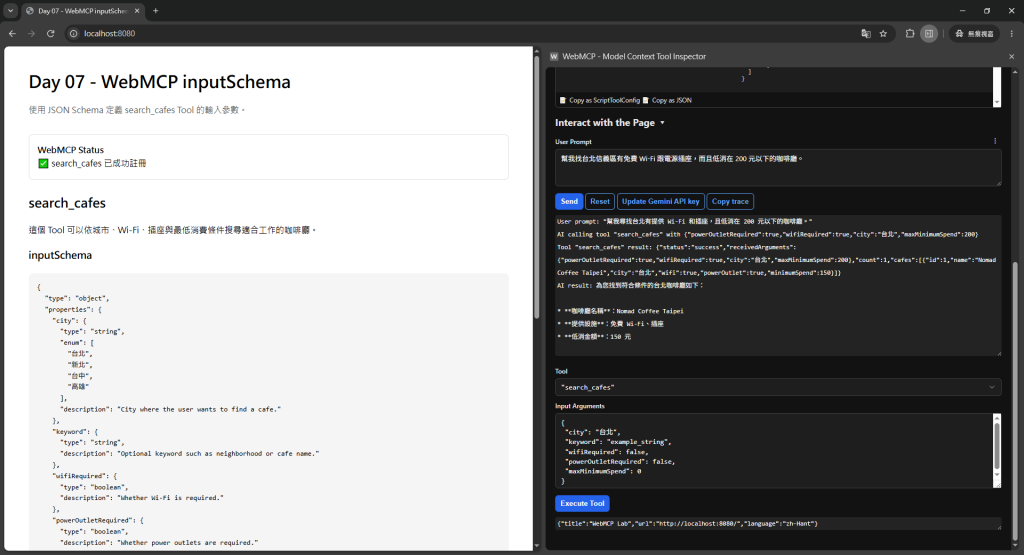
使用者說:
幫我找台北、有 Wi-Fi、有插座,而且最低消費 200 元以下的咖啡廳。
如果 Schema 只有:
inputSchema: {
  type: 'object',
  properties: {
    query: { type: 'string' }
  }
}
Agent 最後只能把整句塞進 query。
不是不能用,但網站後端又要重新解析一次自然語言,等於浪費 Tool Calling 的結構化優勢。
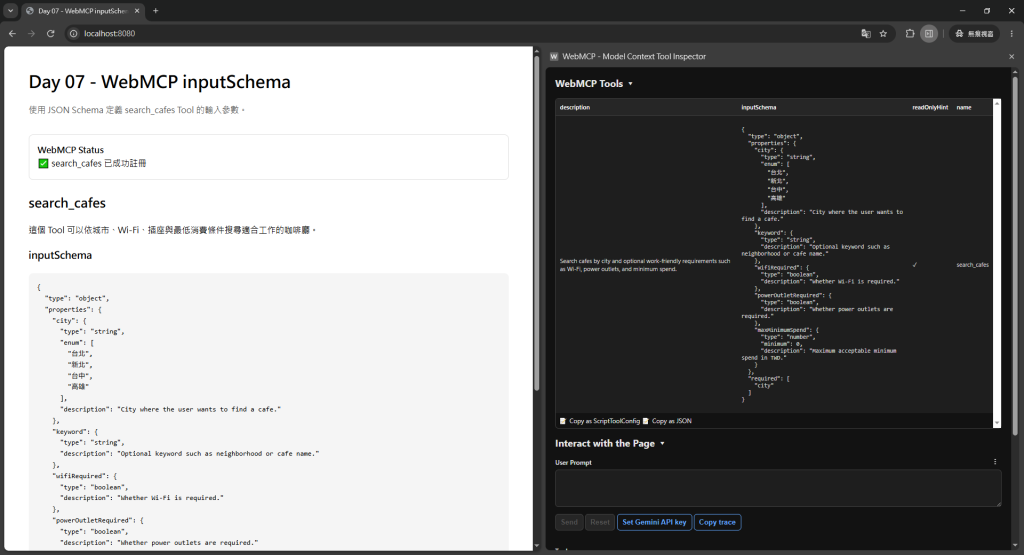
const cafeSearchSchema = {
  type: 'object',
  properties: {
    city: {
      type: 'string',
      enum: ['台北', '新北', '台中', '高雄'],
      description: 'City where the user wants to find a cafe.'
    },
    keyword: {
      type: 'string',
      description: 'Optional keyword such as neighborhood or cafe name.'
    },
    wifiRequired: {
      type: 'boolean',
      description: 'Whether Wi-Fi is required.'
    },
    powerOutletRequired: {
      type: 'boolean',
      description: 'Whether power outlets are required.'
    },
    maxMinimumSpend: {
      type: 'number',
      minimum: 0,
      description: 'Maximum acceptable minimum spend in TWD.'
    }
  },
  required: ['city']
};
📸 圖片 1|Inspector 中的完整
inputSchema
理想輸入:
{
  "city": "台北",
  "wifiRequired": true,
  "powerOutletRequired": true,
  "maxMinimumSpend": 200
}
📸 圖片 2|完整需求被轉成正確 Arguments
很多 API 設計習慣會把所有欄位都 required,但 Agent Tool 不一定適合。
例如:
required: [
  'city',
  'keyword',
  'wifiRequired',
  'powerOutletRequired',
  'maxMinimumSpend'
]
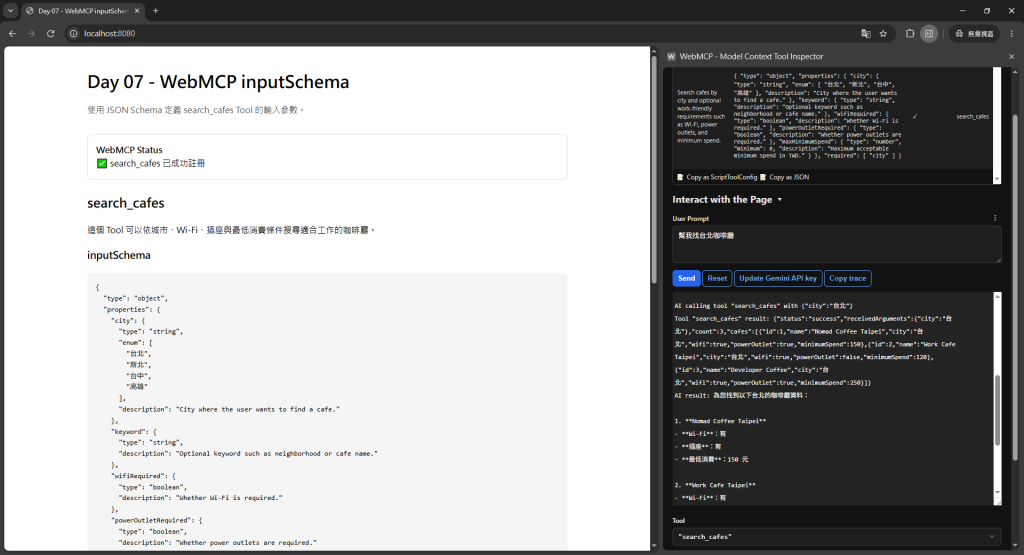
那使用者只說:
幫我找台北咖啡廳
Agent 就被迫替其他欄位猜值。
所以我會問:
沒有這個欄位,後端是不是完全無法完成任務?
如果不是,就讓它 optional。
後端接受:
taipei
new_taipei
taichung
kaohsiung
卻只寫:
city: { type: 'string' }
那 Agent 可能填:
Taipei City
台北市
Taipei
臺北
如果系統只有固定值,應明確限制:
city: {
  type: 'string',
  enum: ['taipei', 'new_taipei', 'taichung', 'kaohsiung']
}
如果還希望模型知道顯示名稱,可以搭配規格支援的 oneOf/const/title 形式,讓機器值和人類語意分開。
maxPrice: { type: 'string' }
會讓:
"一千五"
"1500元"
"NT$1,500"
都可能進來。
如果後端需要數值:
maxPrice: {
  type: 'number',
  minimum: 0
}
Schema 本身就是第一層資料品質控制。
像:
wifiRequired: {
  type: 'boolean'
}
比:
wifi: {
  type: 'string'
}
更清楚。
但也要小心「沒提到」和 false 不完全一樣:
false:使用者明確表示不需要?通常也只是「不限制」。因此 optional boolean 往往比 required boolean 更合理。
📸 圖片 3|沒提到的 optional 欄位沒有被 Agent 亂補
❌ maxPrice: Maximum price.
可以再具體:
✅ Maximum price per item in TWD. Omit when the user did not specify a budget ceiling.
這會直接幫 Agent 判斷「沒提預算時不要硬填 0」。
await document.modelContext.registerTool({
  name: 'search_cafes',
  description: 'Search cafes by city and optional work-friendly requirements such as Wi-Fi, power outlets, and minimum spend.',
  inputSchema: cafeSearchSchema,
  annotations: {
    readOnlyHint: true
  },
  execute: async (input) => {
    const results = await searchCafes(input);

    return JSON.stringify({
      count: results.length,
      cafes: results.slice(0, 10)
    });
  }
});
1. 幫我找台北咖啡廳。
2. 台北有插座的咖啡廳。
3. 台中 Wi-Fi 要好,低消不要超過 150。
4. 找西門附近適合工作的店,預算不限。
5. 我不要找咖啡廳,我要找共同工作空間。
第五句尤其重要:正確結果可能是根本不應該呼叫這個 Tool。
Tool Evals 不只測「參數對不對」,也要測「什麼時候不該用」。
不要因為想控制模型,就把所有東西變 enum。
例如 keyword:
keyword: {
  type: 'string'
}
就合理,因為地區、店名、需求描述本來就可能是自由文字。
設計原則是:
系統有明確有限集合 → enum
系統需要數值 → number / integer
真正二元條件 → boolean
自由搜尋語意 → string
required 只放完成任務真正必要的欄位。enum。


 iThome鐵人賽
 看影片追技術